
Official Guide • Passport Seva 2026
Get Your Indian Passport Without the Hassle
Apply, pay, book your appointment, and track delivery from one official portal. This guide covers fresh passports, renewal, and Tatkal, plus fees, police verification, and timelines.
Register
Create your Passport Seva account
Apply & Pay
Fill the form and pay online
Book Slot
Pick any PSK or POPSK centre
Receive
Delivered by Speed Post
Overview
What Is Passport Seva?
Passport Seva is the official online system run by the Ministry of External Affairs (MEA) that lets Indian citizens apply for and manage their passports digitally.
Instead of visiting offices repeatedly, you complete most steps online: create an account, fill the application, pay the fee, and book an appointment at a Passport Seva Kendra (PSK) or Post Office Passport Seva Kendra (POPSK). The system covers fresh passports, reissue or renewal, Tatkal urgent service, and the Police Clearance Certificate (PCC).
Quick Facts About Passport Seva
- Run by the Ministry of External Affairs through the Passport Seva Portal at passportindia.gov.in
- You can choose any PSK or POPSK across India, regardless of your registered address
- Fresh adult passports are valid for 10 years; minor passports for 5 years or until age 18
- Children born on or after 1 October 2023 must submit a birth certificate as proof of date of birth
- New passports are now chip-enabled e-passports with embedded RFID for added security
Passport Requirements Checker 2026
Select your details to see exact official fees, required documents, timeline, and easy-to-understand notes (including for minors & applications from abroad)
Minors only get 36-page passports (60 pages not available).
This tool uses exact official fees and rules from the Ministry of External Affairs (January 2026). Always double-check on the official Passport Seva portal or Indian embassy for your case.
Getting Started
Registration in 4 Simple Steps
Before you can apply, you need a Passport Seva account. Here is the quick overview.
1
Visit the portal
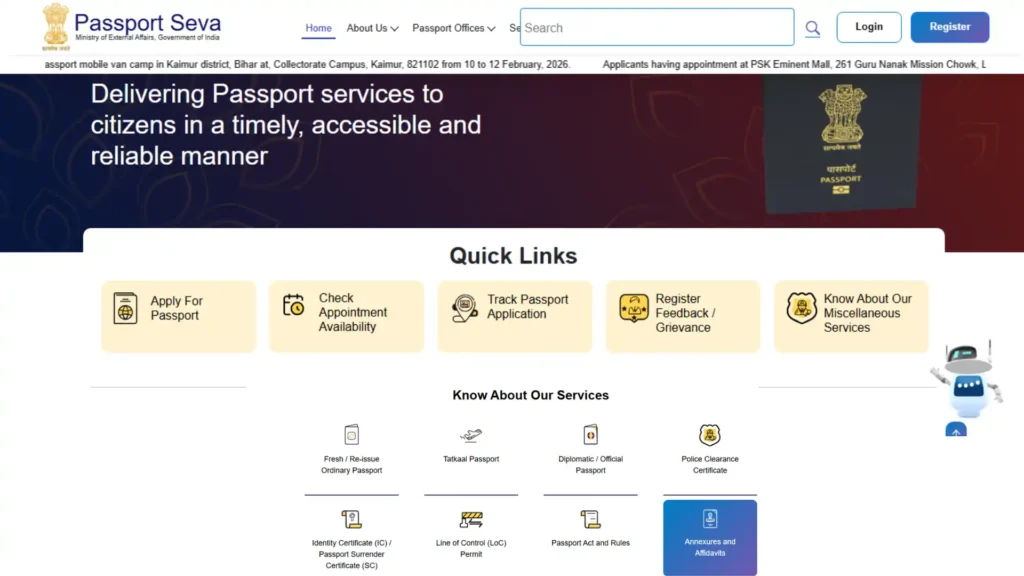
Go to the official Passport Seva Portal at passportindia.gov.in on any device.
2
Register a new account
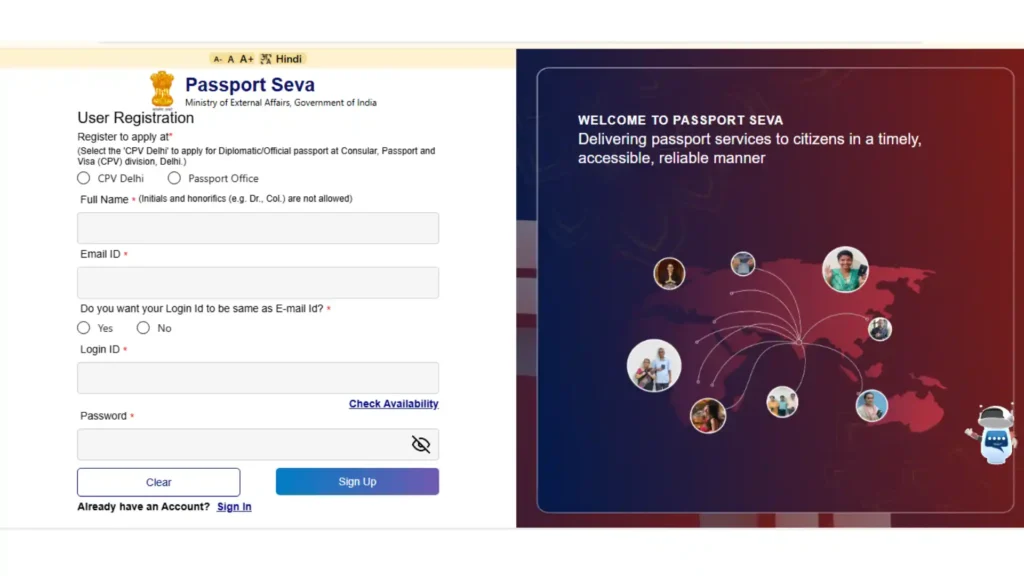
Click Register Now, choose your Passport Office, and enter your name, email, and date of birth exactly as on your documents.
3
Verify your email
Open the activation link sent to your email to confirm and activate your account.

4
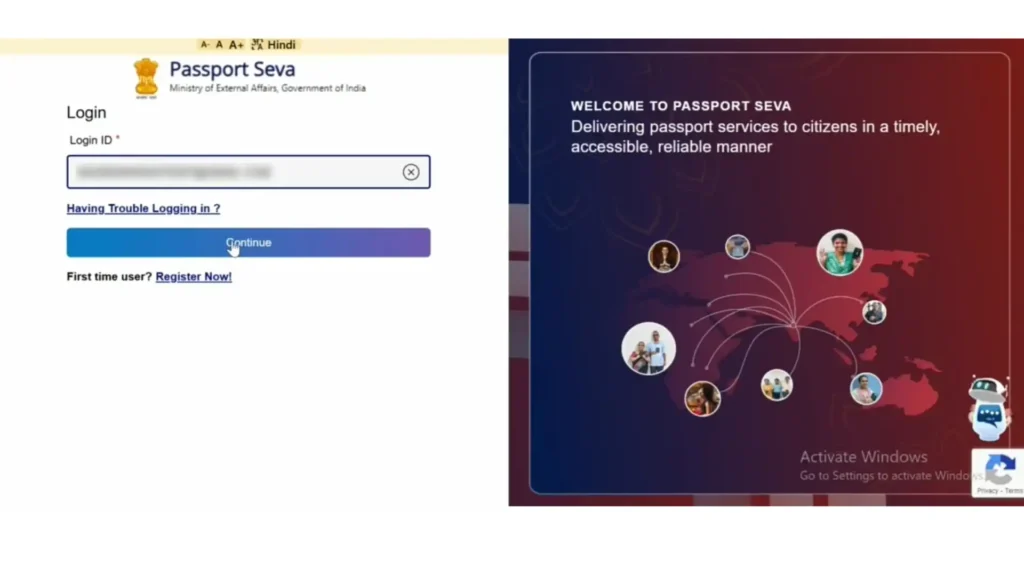
Log in and begin
Sign in with your login ID and password, then start your fresh or reissue application.
Service Types
Which Passport Service Do You Need?
Passport Seva covers three main service paths. Pick the one that matches your situation.
Fresh Passport
For first-time applicants who have never held an Indian passport. You provide proof of identity, address, and date of birth, and complete biometrics at the PSK.
Reissue / Renewal
For renewing an expiring or expired passport, or changing details like name or address. The portal lists most renewals under the Reissue of Passport service.
Tatkal (Urgent)
For applicants who need a passport quickly. Tatkal is processed on priority, often within 1 to 3 working days after document verification, for an extra fee of Rs. 2,000 on top of the normal charges.
Application Guide
How to Apply, Steps 1 to 4
Once your account is active, here is how to complete and submit your passport application.
1
Log in to your account
Sign in to the Passport Seva Portal with your login ID and password.
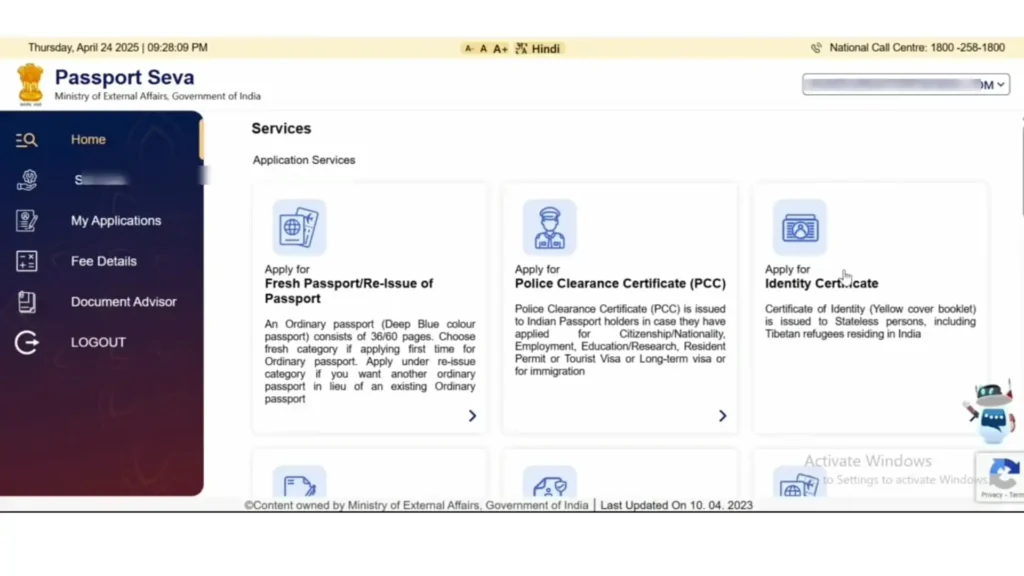
2
Choose your service
Click Apply for Fresh Passport or Reissue of Passport. You can fill the form online or download the e-Form, fill it offline, and upload it.
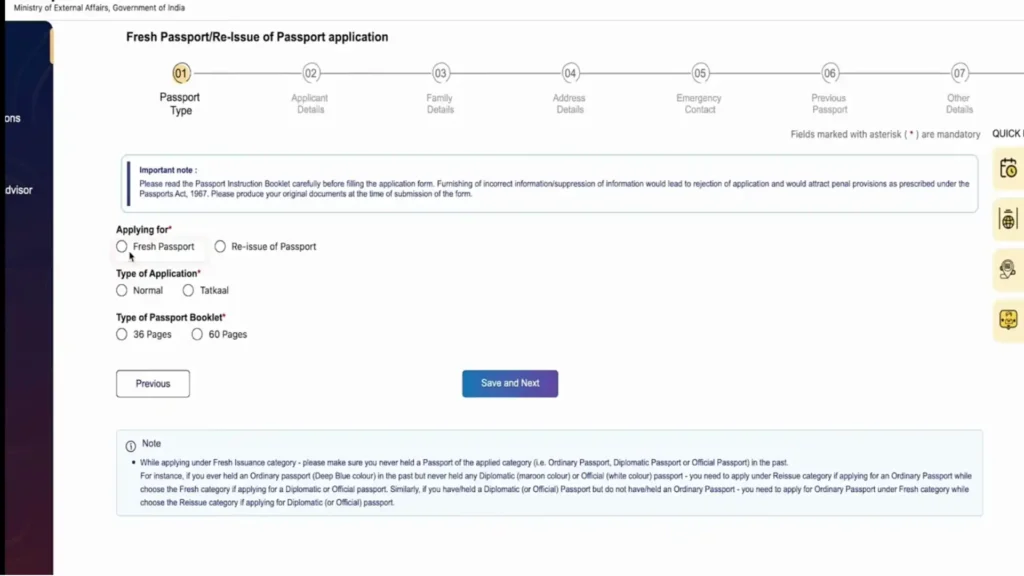
3
Fill in your details
Enter your personal details, address, family information, and references carefully. Make sure everything matches your supporting documents.
4
Review and submit
Check every field, then submit the application. A unique Application Reference Number (ARN) is generated for tracking.
Application Guide
How to Apply, Steps 5 to 8
Next, pay the fee and lock in your appointment slot.
1
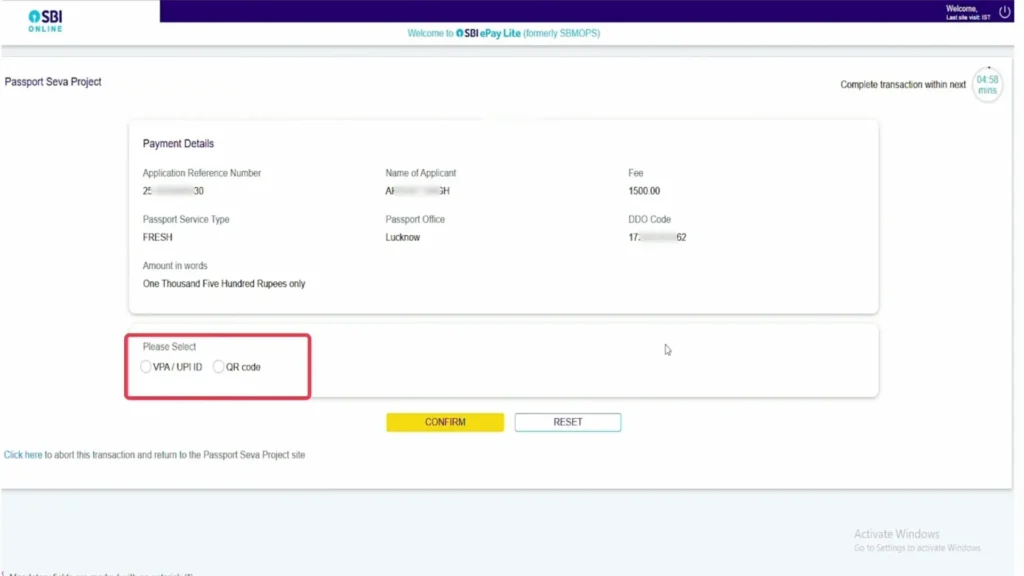
Pay the fee online
Click Pay and Schedule Appointment. Online payment is required for PSK and POPSK bookings. Pay via net banking, debit or credit card, UPI, or SBI challan.
2
Book your appointment
Choose any PSK or POPSK across India and pick an available date and time slot. You are not tied to your home city.
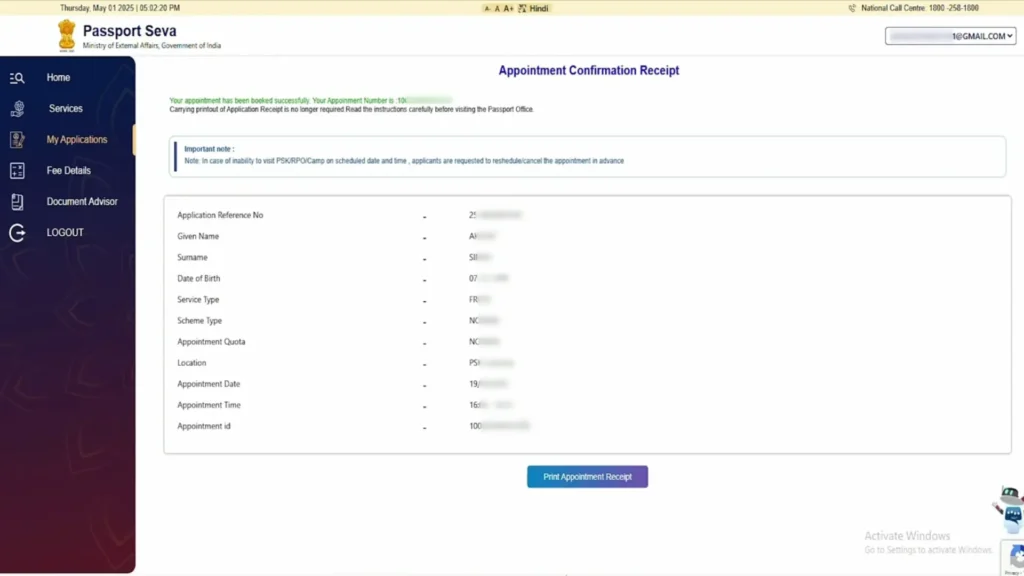
3
Print or save the ARN receipt
Save the Application Receipt with your ARN. A printout is optional, since the appointment SMS is also accepted as proof.

4
Reschedule if needed
You can reschedule a confirmed appointment up to two times within one year of the original date.

Application Guide
How to Apply, Steps 9 to 12
Finally, visit the centre to complete verification and biometrics.
1
Visit the PSK or POPSK
Arrive on your appointment day with your original documents and the application receipt.
2
Token and Counter A, B, C
Collect a token, then move through the three counters: document scanning, photo and biometrics, and final verification by the officer.
3
Photo and biometrics
Your photograph, fingerprints, and signature are captured digitally at the centre.
4
Collect the acknowledgement
After verification, collect the acknowledgement letter. Your application now moves to police verification and printing.
Verification
Police Verification Explained
Most passport applications need police verification. The Passport Office decides whether it happens before or after your passport is issued.
Pre-Police Verification
Verification happens before the passport is printed and dispatched. This is common for fresh passports and some reissue cases. The passport is issued after the report is cleared.
Post-Police Verification
The passport is printed and dispatched first, and verification is completed afterwards. This is often allowed for straightforward reissue cases with a clean record.
How to Prepare for the Police Visit
- Keep your original documents ready at your registered address
- Make sure two references who know you are reachable
- Be available, or have a family member available, when the officer visits
- The mPassport Police App has cut verification time sharply in many states, sometimes to a few days
Track It
How to Check Your Passport Status
After submission you can follow your application through several official channels.
Online Portal
Log in to passportindia.gov.in and use Track Application Status with your File Number and date of birth.
mPassport Seva App
Download the official mPassport Seva app to check status, locate centres, and view fees from your phone.
SMS Service
Send an SMS in the format STATUS followed by your File Number to 9704100100 to get an update without internet access.
Common Status Stages You Will See
- Application submitted and under review
- Appointment booked at PSK or POPSK
- Application granted after document check
- Police verification initiated
- Passport printed and ready for dispatch
- Passport dispatched by Speed Post with tracking number
Timelines
Passport Delivery: Normal vs Tatkal
How long your passport takes depends on the service you chose and whether police verification is before or after dispatch.
| Normal | Tatkal | |
|---|---|---|
| Processing speed | Standard queue | Priority queue |
| Typical time | 15 to 30 working days | 1 to 3 working days after PSK visit |
| Police verification | Often before dispatch | Usually after dispatch |
| Extra fee | None | Rs. 2,000 over normal fee |
| Best for | Regular applications with time to spare | Urgent travel and quick needs |
| Delivery | Speed Post with tracking | Speed Post, adds 3 to 5 days |
What You Can Do
Passport Seva Portal Features
The portal is more than an application form. Here is what else you can do online.
Fee Calculator
Estimate the exact fee for your application type, age group, and booklet size before you pay.
Locate a Centre
Find your nearest PSK or POPSK and check available appointment slots.
Document Advisor
Get a personalised list of the exact documents you need for your service.
Track Status
Follow your application from submission to dispatch in real time.
Reschedule Appointment
Move your appointment up to two times within a year of the original date.
Apply for PCC
Apply for a Police Clearance Certificate for visa, immigration, or overseas jobs.
Why Online
Benefits of Using Passport Seva Online
The digital system saves time and removes much of the old hassle.
Saves Time
Apply, pay, and book appointments from home instead of standing in long queues.
Apply Anywhere
Choose any PSK or POPSK in India, useful if you study or work away from your home town.
Secure and Official
All steps run on the government portal, with e-passports adding chip-based security.
Full Transparency
Track every stage online so you always know where your application stands.
Tatkal Option
Choose Tatkal when you need a passport fast, with priority processing.
Home Delivery
Your passport arrives by Speed Post with a tracking number, no need to collect it.
Help
Common Questions and Issues
Quick answers to the questions applicants ask most often.
National Call Centre Helpline
For any application issue, call the Passport Seva National Call Centre at 1800-258-1800 (toll free), available to help with status, appointments, and general queries.
Side by Side
Normal vs Tatkal: Full Comparison
A detailed look to help you decide between the two routes.
| Feature | Normal Scheme | Tatkal Scheme |
|---|---|---|
| Processing time | 15 to 30 working days | 1 to 3 working days after PSK visit |
| Extra fee | No extra fee | Rs. 2,000 over the normal fee |
| Police verification | Usually before issuance | Usually after issuance |
| Documents needed | Standard ID, address, DOB proof | Standard set plus 3 of 15 listed under Annexure F |
| Eligibility | All eligible citizens | Most citizens, some categories excluded |
| Payment | Full fee online | Normal fee online, Tatkal balance can be cash at PSK |
| Best for | Planned applications | Urgent travel needs |
| Delivery | Speed Post | Speed Post, slightly faster dispatch |
Where to Go
Regional Passport Offices (RPOs) Across India
India has Regional Passport Offices (RPOs) that oversee the PSKs and POPSKs in their region. Below are major RPO cities by zone.
North Zone
Delhi, Chandigarh, Jaipur, Lucknow, Ghaziabad, Bareilly, Amritsar, Jammu, Shimla, and Dehradun.
South Zone
Chennai, Bengaluru, Hyderabad, Kochi, Trivandrum, Madurai, Coimbatore, Visakhapatnam, and Kozhikode.
West Zone
Mumbai, Pune, Nagpur, Ahmedabad, Surat, Panaji, Thane, and Nashik.
East and North-East Zone
Kolkata, Bhubaneswar, Patna, Ranchi, Guwahati, Raipur, and Siliguri.
Finding Your Nearest Centre
You are not limited to the RPO of your home city. Use the Locate Centre tool on the Passport Seva Portal to find the nearest PSK or POPSK and check live appointment availability. POPSKs run inside select post offices and have widened access in smaller towns.
Get Support
Contact and Support
If you need help at any stage, these official channels can assist you.
Call Centre
Reach the Passport Seva National Call Centre at 1800-258-1800, toll free across India.
Official Website
Visit passportindia.gov.in for applications, status tracking, fees, and centre locations.
mPassport Seva App
Use the official mobile app to apply, pay, track, and locate centres on the go.
Ready to Apply
Your Passport Journey Starts Here
Whether it is a fresh passport, a renewal, or an urgent Tatkal application, the Passport Seva Portal puts the whole process in your hands. Create your account, fill the form, pay online, book your slot, and track it to your doorstep. Keep your documents accurate, choose the right service, and you can get your passport with far less stress than before.
